Showing posts with label Graphics Software. Show all posts

May 4, 2013

How to Disable the Typing Animation Feature in Office 2013

,

Microsoft attempted to make typing appear smoother in Office 2013 by adding a typing animation feature. If you’re a slow typist, you probably won’t notice it. However, if you type upwards of 80+ words per minute, this feature can be distracting and annoying.
The typing animation feature can also be disruptive if you have a slower computer. This feature is on by default, but it can be disabled. To do so, you must edit the registry.
NOTE: Before making changes to the registry, be sure you back it up. We also recommend creating a restore point you can use to restore your system if something goes wrong.
To open the Registry Editor, press the Windows key + R to open the Run dialog box. Type “regedit” (without the quotes) in the Open edit box and click OK.


If the User Account Control dialog box displays, click Yes to continue.
NOTE: You may not see this dialog box, depending on your User Account Control settings.


Navigate to the following key:
HKEY_CURRENT_USER\Software\Microsoft\Office\15.0\Common
If there is no Graphics key under the Common key, right-click on the Common key and select New | Key from the popup menu.
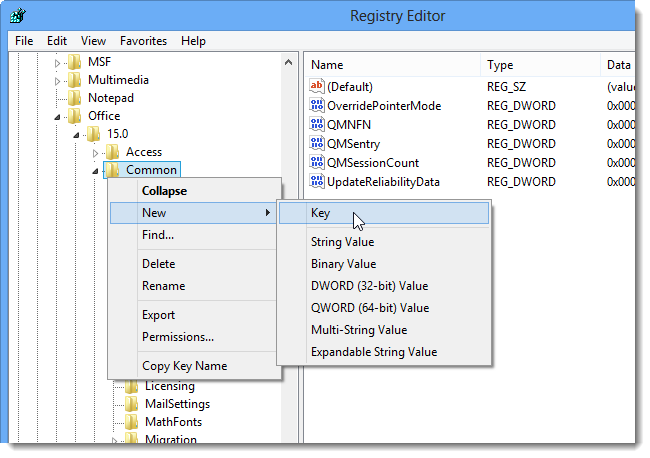
 A new key is added to the bottom of the list under the Common key and the name is highlighted. Type Graphics for the name of the key.

 Right-click in an empty area on the right side of the editor and select New DWORD (32-bit) Value from the popup menu.

 Name that new value DisableAnimation, as shown below, and double-click on the new value.


 Change the number in the Value data edit box to “1” and click OK.

To close the Registry Editor, select Exit from the File menu. Restart Windows for the change to take effect.


To turn the typing animation back on, go back into the Registry Editor, and either delete the DisableAnimation value and the Graphics key or change the Value data for the DisableAnimation value to “0.”
NOTE: Disabling the typing animation feature in Office 2013 turns it off for all Office programs. You cannot leave the feature on for certain programs.





Apr 11, 2012

How to Create a Voice Box on IMVU

,

If you own a computer microphone, you can make a voice box from your own voice.
How to Create a Voice Box on IMVU thumbnailAn IMVU voice box is an invisible accessory for an avatar to wear and contains triggers linked to sounds. Whenever a trigger word is typed in the chat, the corresponding sound will play. Voice boxes you create can then be purchased by other IMVU users through the IMVU catalog, earning you credits. Creating voice boxes, like creating any other product, requires you to have purchased your avatar name on IMVU and signed up as a content creator.

Apr 8, 2012

How to Fix Your Picture Up for IMVU

,


The online IMVU game allows you to create a profile to meet people, play games and chat. You can upload a custom picture as your profile image. The profile picture can be up to 39 KB in size; if your photo is larger than 39 KB, it will fail to upload. If your picture is larger than this, you can fix your picture and edit the size using the built-in simple graphics program, Microsoft Paint.

Apr 6, 2012

How to Drop a Mesh Soft Body in Maya

,
Maya is a 3-D modeling and animation program that allows 3-D artists to create complex scenes and fully animated characters. Maya aids artists in this respect by enabling soft body mesh creation. These meshes allow each vertex point of the model to move independently as though it were a separate particle, enabling the creation of wave effects, cloth draping and other complex animation effects. Soft body meshes can even replicate effects such as gravity, allowing for realistic drop effects in animations without the hours of work they would take to create by hand.

Tutorial for Quality of Mental Ray Sampling in 3D Studio Max

,
Mental Ray is a ray-tracing rendering plugin for 3D Studio Max, known as 3ds Max, and other 3-D modeling programs that allows 3-D artists to create high-quality photorealistic renderings of static and animated scenes. Using Mental Ray rendering doesn't guarantee photorealistic renders or a high render quality, of course; as with any other tool, the rendering plugin must be used correctly for high-quality results.

Maya Runtime Expression Processing

,
Autodesk's Maya is a 3D modeling and animation program that gives animators and modelers a variety of customizable tools to streamline or automate their work. One of these tools is the Expressions Editor which allows you to create automation scripts from within the program interface. The scripts, known as expressions, are typically used to automate animation actions to make the process of animating a rigged model go more smoothly.

Help for Fabric for 3D Studio Max

,
large part of making realistic models in 3D Studio Max involves covering the models in layers of material to simulate skin, fur or cloth. With early versions of 3D Studio Max, this was done either through the painstaking modeling of each fold and bunch of the covering layer or with the aid of a plugin. With new versions of the software, there are several choices of tools to use for the modeling and animation of clothing and other covering materials.

A Fatal Error in Autodesk TrueView

,
Autodesk TrueView is a free document viewer that allows users to view DWG and DXF files that were created by AutoCAD and other computer-aided drafting and design programs. While TrueView can theoretically open any supported file without problems, errors do occasionally occur when users launch or use the program. Some of these errors are fatal errors, resulting in TrueView's crashing completely.

A Computer Class 3D Modeling Tutorial

,
3D modeling can be an extremely complicated process. Creating a simplistic model can require hours of work, especially if the model is covered with a texture and lit within for presentation. While many 3D modelers learn the art of 3D modeling on their own with a minimum of help from other users, there are classes available that will take a prospective modeler from familiarization with modeling programs to learning the subtle nuances of the modeling process that make realistic advanced modeling possible.

Rigging Features for Autodesk 3D Studio Max 9

,
Autodesk’s 3D Studio Max 9 is an advanced 3D modeling and animation program designed to ease the animation process through its primary rigging features. Once you’ve connected the model to the rig, you can move the model smoothly simply by moving the rig as desired. With proper application of the rigging modes supplied with 3D Studio Max 9, you can control the movement of a model precisely, with each rigged section moving naturally along a jointed location.

Should I Run 3D Studio Max in OpenGL?

,
3D Studio Max has allowed the use of OpenGL since the earliest releases of its modeling and animation software platform. As a graphics driver, OpenGL allows for quick modeling of complicated objects in 3D Studio Max, especially when those objects are based on polygons. The question on whether a user should run 3D Studio Max in OpenGL is largely dependent on what sort of object is being designed.

Google SketchUp: Polygon Limit

,
With the use of Google SketchUp, designers, engineers and average people can create 3D models of all sorts of different images. The 3D effect is essentially achieved by combining a number of polygons, or multi-sided shapes. As in any program, the more data that is added to a file, the more memory it will require from your

How to Use Illustrator to Make Vinyl Stickers

,
Adobe Illustrator CS5 makes it possible to create your own vinyl stickers. Vinyl stickers are resilient and useful for decorating windows, notebook covers, books, musical instruments and even dorm room walls. Vinyl comes in several colors and provides an option for high-quality art productions on a limited budget. Place stickers virtually anywhere that has a clean, flat and smooth surface. With the help of a vinyl-cutting machine, you can begin to create your own stickers and liven up your office or home with original creations.

AutoCAD and Bad Pixels

,
AutoCAD is a computer-aided design program used primarily for industrial design projects. With AutoCAD, anything from furniture to circuit boards can be designed in 3-D. Because the application is capable of very precise detail, bad pixels on a monitor can interfere with the view, complicating design and obfuscating display of very small AutoCAD objects.

How to Make a Motion Capture Animation in 3D Studio Max

,
If you are interested in using real world simulations to propel a character in your animation, you can utilize motion-capture animation in 3D Studio Max. An artist creates traditional animation by drawing multiple frames with minute differences between each image. For example, a walking character is drawn many times, and in each image, the legs are repositioned ever so slightly to simulate movement. Using motion-capture technology, movement can be recorded from sensors fastened to an actor’s body. The resulting data file is then imported into a 3D Studio Max project and applied to a character, making it move in the same way as the actor moved in real life.

Battle Animation Tutorial

,
Tricking the mind into believing a series of still frame images are moving across a video screen, animation creates the illusion of continual motion. A common use of animation is in the creation of computer simulated battle games, where action figures move and

The Computer Crashes When Leaving SolidWorks

,
crash is a program's way of telling you it is unable to continue functioning as intended. It is usually accompanied by an error message, but it is also possible for a program to shut down without warning. SolidWorks 3D CAD works best if your computer meets the system requirements. Errors are possible even if your system is fully supported, but are more likely to occur if certain hardware isn't up to par.

Apr 5, 2012

AutoCAD Standards & Symbols

,
AutoCAD standards help establish consistency and productivity in engineering design. Standards for industries such as electrical and mechanical drafting are supported by AutoCAD, which allows inventors to create industry-compliant designs for prototypes. AutoCAD connects with a database of top manufacturers who design buttons, switches and thousands of other parts, which is expressed in AutoCAD as symbols that resemble the physical parts.

Maya 3D Spark Effects

,
Mastering the basics is essential to using Maya 3D correctly, but provides only a glimpse of its true potential. Tackling advanced techniques, such as 3D images with spark effects, moves you further up what can be a steep learning curve and closer to a full realization of all this animation software has to offer. Before taking on a project that includes spark effects, however, make sure that you fully understand the concept of “nParticles,” as they are a core component in the overall effect.

Maya 2011 Backwards Compatibility

,
Maya 2011 is not backwards compatible with older versions. When you create a scene in the program, you are not able to open it in older versions of Maya using the default Maya file format. However, several other methods exist that you can use to port your scenes from one version to another.

Maya Default File Format

  • Maya has two default file formats: Maya ASCII and Maya Binary. The first has the extension ".ma," while the second has the extension ".mb." While each version of Maya uses these native formats, they do not offer backwards compatibility. If you create a scene in Maya 2011 and save it in either of these formats, Maya 2010 cannot open it. While each format is the same, each version of the program contains features and other elements that are not supported in previous versions.

Ignore Version

  • While the program offers no direct backwards compatibility, you can nevertheless attempt to open a file made in a new version of Maya with an older version. To do this, open the file as you normally would, but instead of clicking "OK," click "Options." In the Options dialog box, look for the check box for the "Ignore Version" option. When you check this box, Maya attempts to open the file regardless of the version in which it was created. This is not a perfect solution; in some cases, your scene may be missing elements, such as cameras and lights, and in others, you may receive an error message.

Export Options

  • You can get around the backwards compatibility problem by exporting your scene instead of using Maya's native file formats. All versions of Maya feature support for the .obj extension format in their Export menus. When you export your scene as an OBJ file, Maya saves all the geometry info such as vertices and UV coordinates along with the texture data. However, the OBJ format does not have full support for camera and light placement, and you will likely have to place those objects again in the older version of Maya.

FBX Format

  • All versions of Maya support the FBX format. This format was developed by AutoDesk to provide support among its products, including Maya and 3D Studio Max. You can use it to port scenes from version to version in Maya. This file format is a better choice than OBJ if you have complex lighting and camera placement in your scene. Obtain FBX support by downloading and installing the FBX plugin to all your versions of Maya.
 

HowToYo Copyright © 2011 | Template design by O Pregador | Powered by Blogger Templates